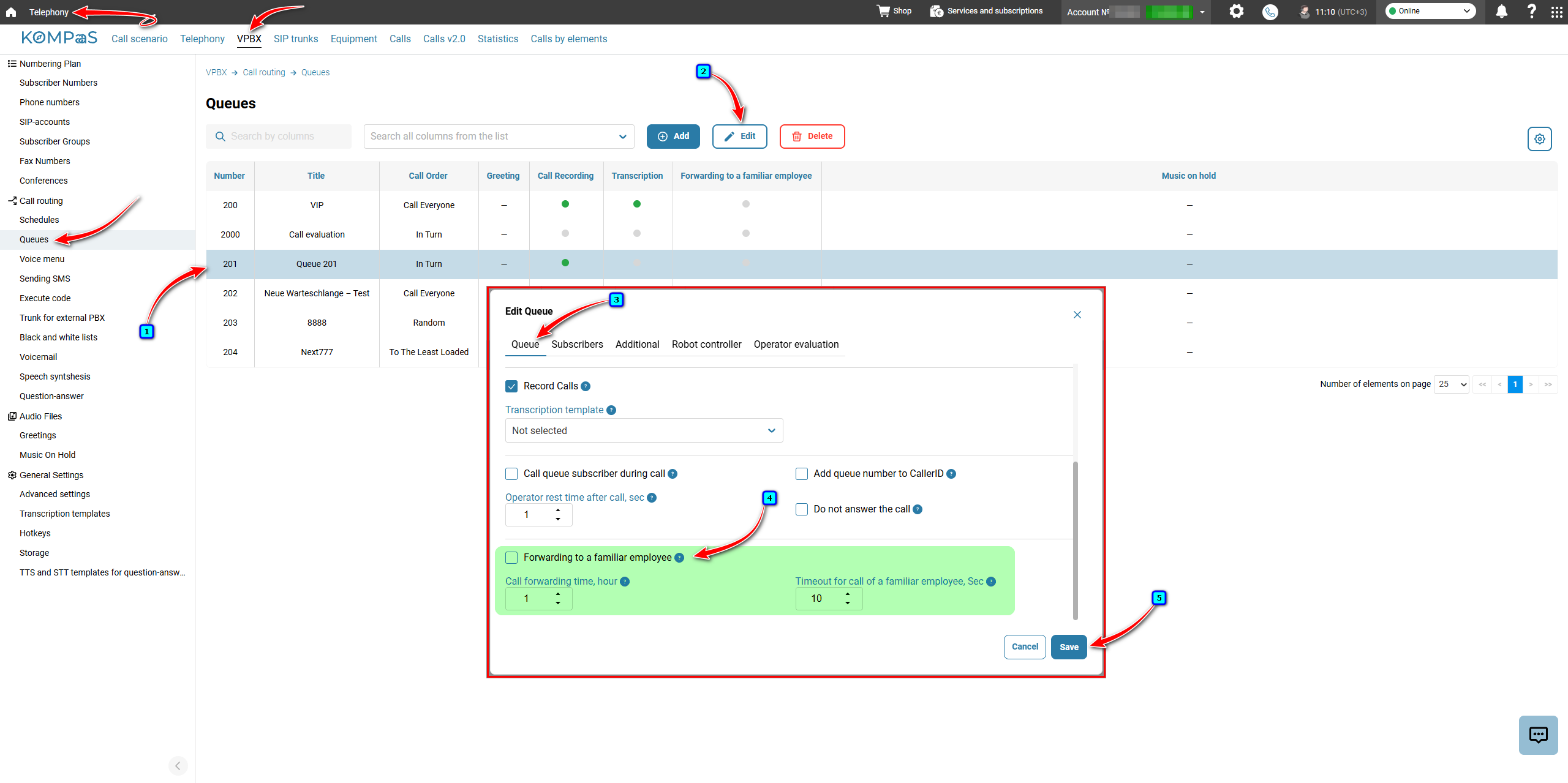
To configure this feature, go to 'Telephony' → 'VPBX' tab → 'Call routing' menu on the left → 'Queues'.
Select the queue for which you want to enable the 'Forwarding to a familiar employee' feature and click 'Edit'.
Go to the 'Queues' tab.
Select the 'Forwarding to a familiar employee' checkbox.
Configure the following parameters:
Call forwarding time, hour — select the time interval during which the feature will be active. Available values are 1 hour, 8 hours, and 24 hours. The feature will stop working once this period expires.
Timeout for call of a familiar employee, Sec — specify the number of seconds the system will spend trying to reach the subscriber who previously received a call from this phone number within the time interval specified by the 'Call forwarding time, hour' parameter.
Click 'Save'.
Also see:
Was this article helpful?
That’s Great!
Thank you for your feedback
Sorry! We couldn't be helpful
Thank you for your feedback
Feedback sent
We appreciate your effort and will try to fix the article