Outbound routing determines how outgoing calls are processed. All calls that are not internal or service calls are considered outgoing calls.
In the ‘Telephony’ → ’VPBX’ tab → ’Numbering Plan’ in the left-hand menu → 'Phone numbers', select the number and click ’Edit’.
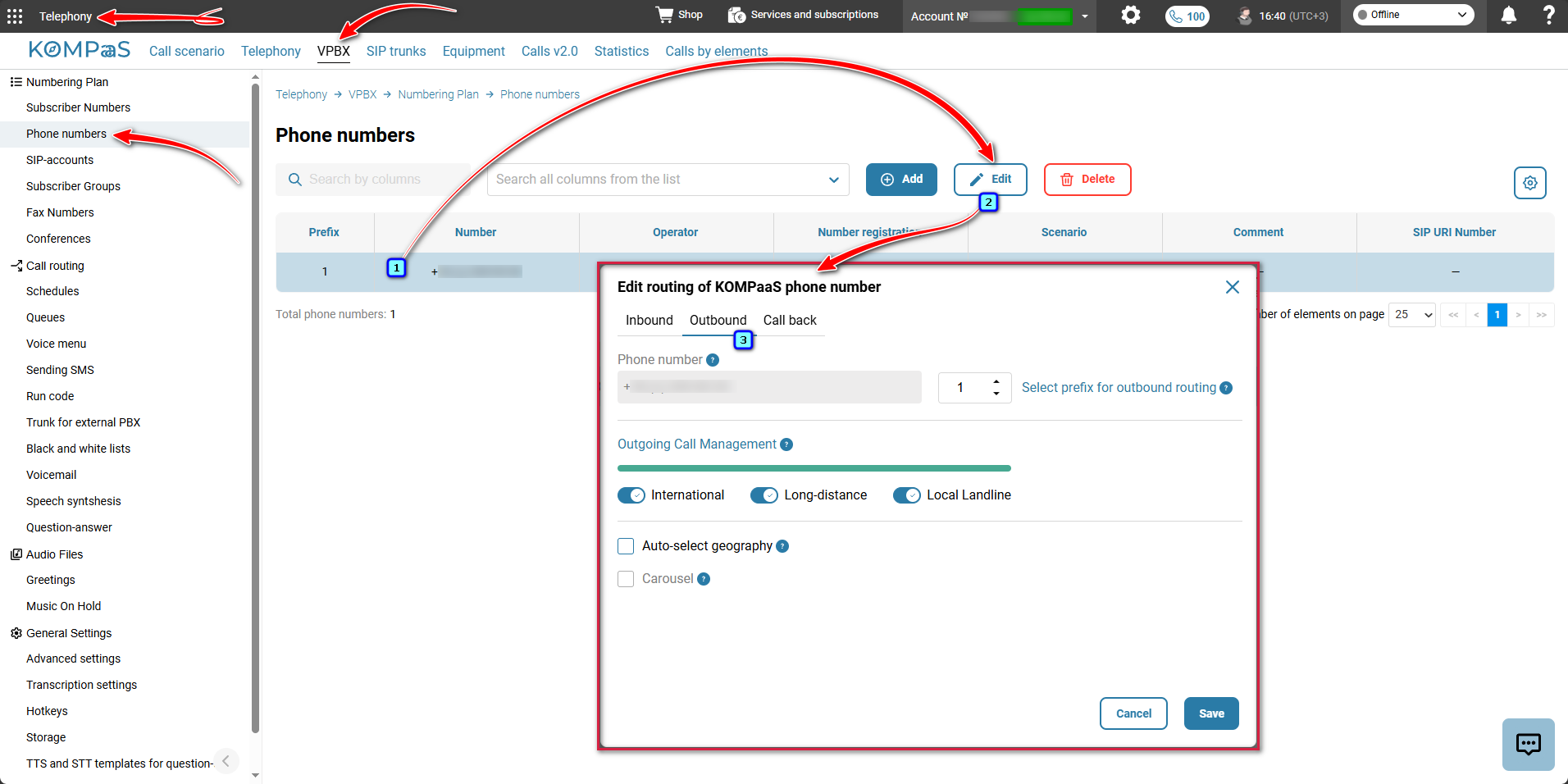
- Select prefix for outbound routing — to select a prefix, use the ‘up’ and ‘down’ arrows (from 1 to 9999). For more information, see 'Telephone number prefix'.
- Dial the number in the following order — prefix (for example 1), then the symbol and the called party's number:
- Hungary
1*+361234567898- or
2*061234567898
- Slovakia
1*+421123456789- or
2*0123456789
- Germany
1*+493012345678- or
2*03012345678
- France
1*+33123456789- or
2*0123456789
- Hungary
- Dial the number in the following order — prefix (for example 1), then the symbol and the called party's number:
- Outgoing Call Management— to block/restrict outgoing calls, use the toggle corresponding to the required destination. By default, all outgoing calls from the phone number are allowed.
- International — international outgoing calls from the phone number will be blocked.
- Long-distance — international and long-distance outgoing calls from the phone number will be blocked. Only calls to local landline and mobile numbers are allowed;
- Local Landline — all outgoing calls except calls to emergency services will be blocked. This option can be selected if the customer only requires incoming calls.
- Auto-select geography — automatically determines the region of the called party and selects the most appropriate phone number for the outgoing call from those connected to the virtual PBX. See also ’Autoselect by Region’.
- Carousel — automatically substitutes phone numbers during outbound calling.
Also see:
Was this article helpful?
That’s Great!
Thank you for your feedback
Sorry! We couldn't be helpful
Thank you for your feedback
Feedback sent
We appreciate your effort and will try to fix the article