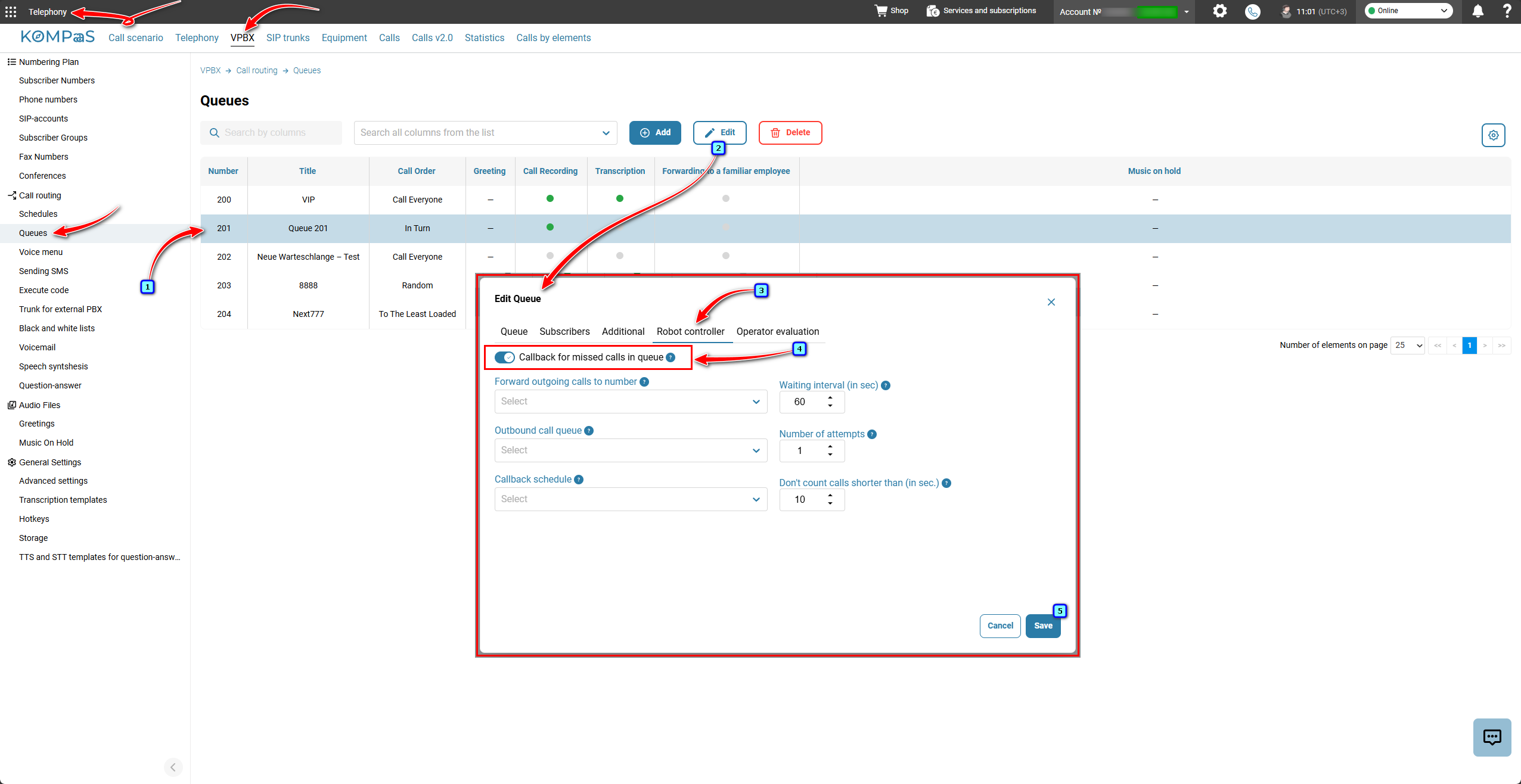
The 'Robot controller' function is configured in 'Telephony' → 'VPBX' tab → 'Queues' menu on the left.
To enable the robot controller:
Select a queue or create a new one by clicking the 'Add' button.
On the 'Robot controller' tab, move the slider next to 'Callback for missed calls in queue' to the right.
Configure the function parameters using the tooltips that appear when you hover over the grey circle with a question mark.
Click the 'Save'button.
✅Note:
Callbacks for missed calls will start according to the 'Waiting interval (in sec)' parameter. Callback data is collected once per minute. The minimum callback interval is 60 seconds.
Also see:
Was this article helpful?
That’s Great!
Thank you for your feedback
Sorry! We couldn't be helpful
Thank you for your feedback
Feedback sent
We appreciate your effort and will try to fix the article