Transcription templates allow you to configure speech recognition for different languages and apply these settings to call scenarios, queues, and subscribers. For example, you can create separate templates for Hungarian, German, French, and Spanish.
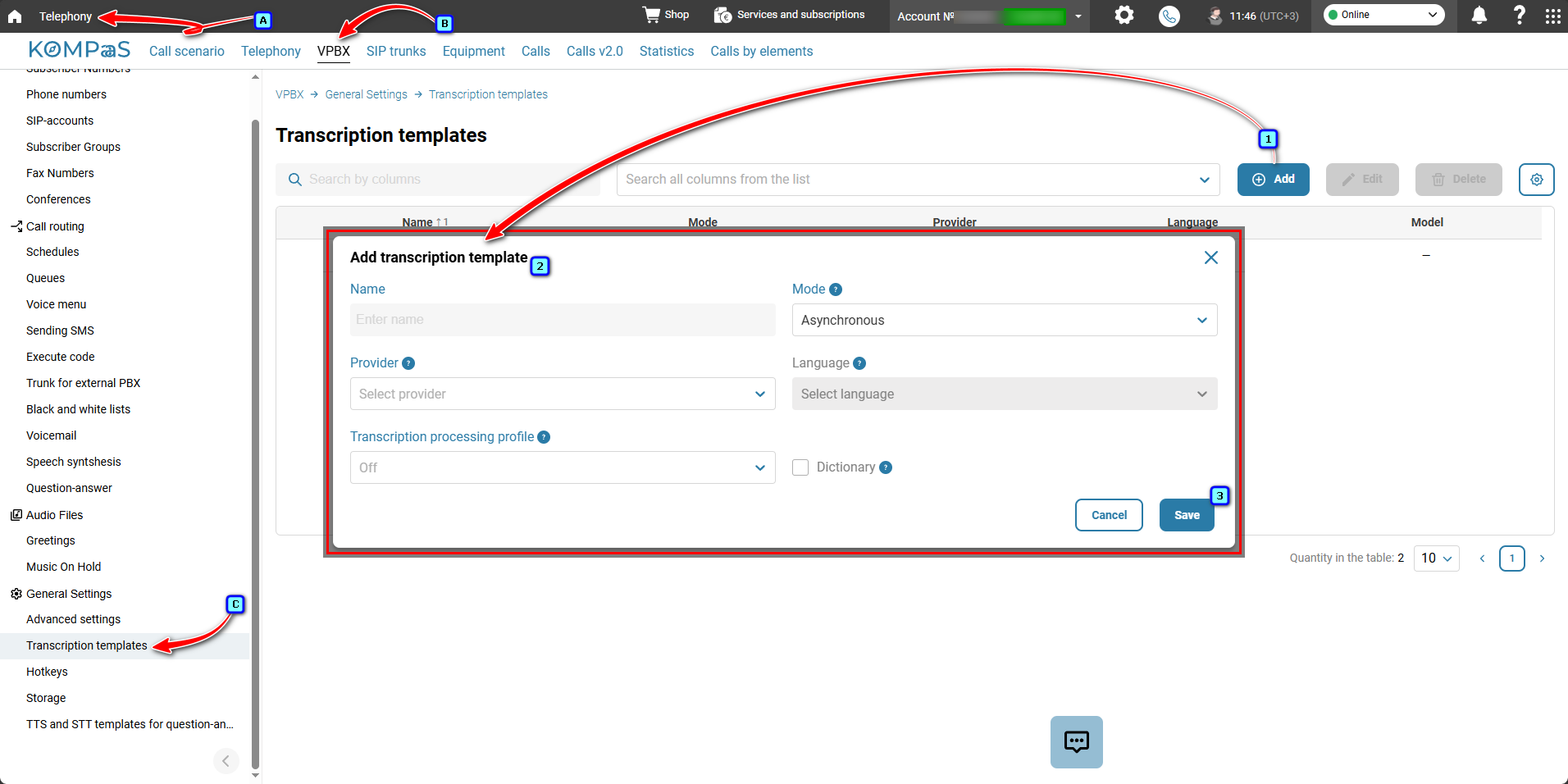
To create a new template, go to 'Telephony' → 'VPBX' tab → 'Transcription templates' in the left-hand menu and click 'Add'.
Fill in the fields:
Name — the template name displayed in the 'Transcription templates' field.
Provider — the AI engine that converts speech into text and processes it.
deepgram — an ultra-fast engine with minimal latency.
google — a multilingual service that supports more than 120 languages.
yandex — it offers high recognition accuracy, proper punctuation, and robust performance in noisy environments.
Transcription processing profile — the time limit (in seconds) measured from the start of a phone call, during which the system converts speech into text. Once this limit is reached, transcription is forcibly stopped, even if the call is still in progress. This affects the budget and resource consumption, the accuracy of initial routing and tagging, and the response time of triggers (agent assistance).
Mode:
Asynchronous — converts an already recorded call into text in deferred (offline) mode, without waiting for an immediate real-time response.
Real-time — converts the participants' speech into text during the call, with minimal latency.
Language — the acoustic and language model that the neural network uses to convert audio into text.
Use a dictionary — allows you to add industry-specific slang, rare surnames, names of new companies, or product codes.
Word or phrase replacement — replaces recognized words or phrases in the resulting text to make it easier to read and use in reports.
Accepted recognition and synonyms — enables the system to recognize different phrases with the same meaning for use in logic (bots, tags, and triggers), without necessarily changing the transcribed text.
Click 'Save'.
Was this article helpful?
That’s Great!
Thank you for your feedback
Sorry! We couldn't be helpful
Thank you for your feedback
Feedback sent
We appreciate your effort and will try to fix the article