Quick download of the Kompaas Softphone using a QR code

Módosítva ekkor Thu, 29 Okt ekkor: 1:42 DU

To quickly install the Kompaas Softphone application on a mobile device with Android operating system, simply scan the QR code.

✅Note:
QR code (Quick Response Code) is a quick response code. QR code is a two-dimensional barcode that provides information for quick recognition using a mobile phone camera.


For correct operation of the softphone, see the instruction 'KOMPaaS Softphone'.

✅Attention!

The application does not work on Android below 8.1.1 and does not work on any version of the stripped-down Android GO Edition.


To quickly download the softphone to your mobile device:

  1. Go to 'Telephony' → 'Equipment'.

  2. And point your mobile device's camera at the QR code.


✅Note:
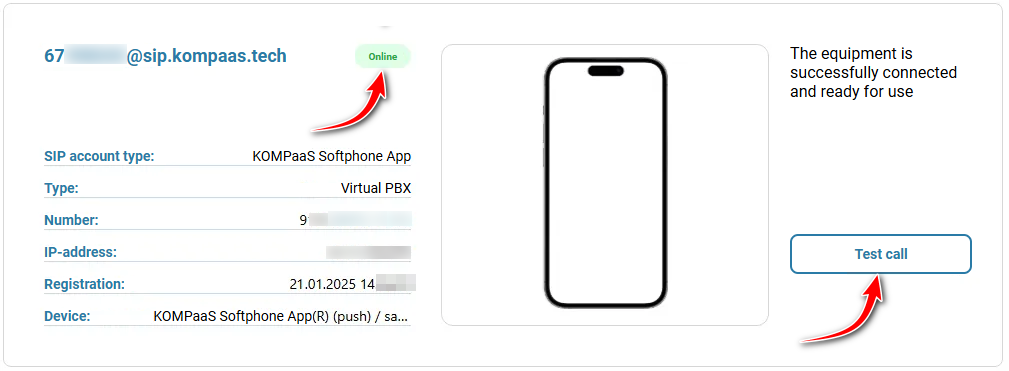
If KOMPaaS Softphone is already installed and the user is online, equipment parameters will be displayed instead of the QR code, and a test call will be available.


Also see:

'KOMPaaS Softphone'


Hasznosnak találta a cikket?

Nagyszerű!

Köszönjük visszajelzését

Sajnáljuk, hogy nem tudtunk segíteni

Köszönjük visszajelzését

Tudassa velünk hogyan javíthatnák ezen a cikken!

Válasszon ki legalább egy okot
CAPTCHA hitelesítés szükséges.

Visszajelzés elküldve

Köszönjük közreműködését és megpróbljuk a cikket kijavítani